Hands-On AI
Agentic Shopping with Claude Code Custom Skills and the Chrome Extension
How I built an autonomous grocery shopping agent using Claude Code custom skills and the /chrome browser extension — querying 40+ orders of purchase history, comparing per-unit prices, and building my Morrisons trolley from the terminal.
The problem
I spend about 30 minutes twice a week doing an online grocery shop. It is not hard work, but it is deeply repetitive. Every week I am answering the same questions:
- What do we usually buy?
- What did I forget last time?
- Is the own-brand version cheaper per kilo?
- Are we due eggs, toilet paper, or stock cubes this month?
- Have I hit the minimum basket to avoid the delivery charge?
This is textbook TOIL — repetitive, automatable work that scales linearly with time and delivers zero value beyond the output itself. In SRE terms, it is the kind of operational burden you eliminate first.
I already had the data. Morrisons lets you export order history as CSV. 40+ orders, every product, every price. The question was whether I could turn that data into an agent that actually does the shop for me — and in the process, start justifying the £90/month I spend on Claude Max.
Architecture
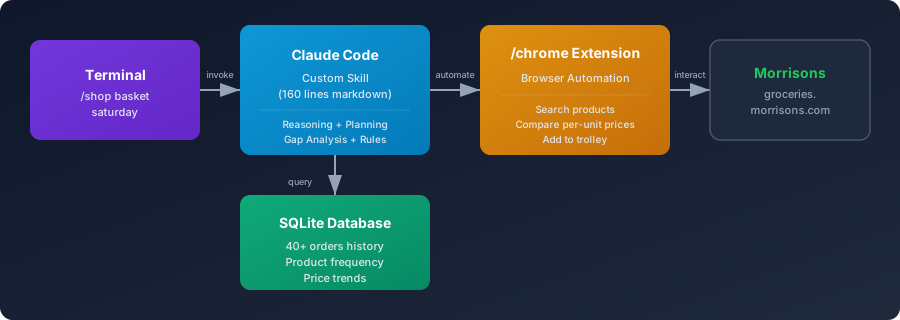
The stack
No Python backend. No API integrations. No cloud functions. The entire system is:
| Component | Purpose |
|---|---|
| Claude Code | AI reasoning engine, runs in the terminal |
Custom skill (/shop) | 160 lines of markdown defining the agent's behaviour |
| SQLite database | 40+ orders of purchase history, product frequency, price trends |
Chrome extension (/chrome) | Browser automation — search, compare, click, add to trolley |
That is it. The skill file is a markdown prompt. The database is a single .db file. The browser extension connects Claude Code to a real Chrome session.
How it works
1. Purchase history as memory
The CSV export from Morrisons gets ingested into SQLite. The schema tracks orders, products, and per-item pricing over time:
-- products table (aggregated)
product_name, times_ordered, total_quantity, total_spent,
avg_price, min_price, max_price, first_ordered, last_ordered

-- product_summary view (derived)
days_span, avg_days_between_orders
This gives the agent a complete picture of what I buy, how often, and what I normally pay. When I type /shop basket saturday, the agent queries the database to understand my purchasing patterns before touching the browser.
Crucially, the database also gives the agent a price memory. It knows what I paid for semi-skimmed milk six months ago, what I paid last week, and what the trend looks like. When it hits the live site and sees today's price, it has genuine context for whether that price is normal, inflated, or a good deal. This is not a price comparison tool — it is a personal inflation tracker built from real purchase data.
2. Frequency-based basket building
The agent does not just dump my last order into a trolley. It calculates purchase frequency across all 40+ orders and builds a basket based on what is statistically due:
- High priority (50%+ frequency): Items I buy almost every week — wholemeal bread, carrot batons, milk, sausages, mixed peppers
- Strong regulars (35-50%): Items I buy most weeks — bacon, cherry tomatoes, chicken breast
- Occasional (20-35%): Items for rounding out the basket or hitting the delivery minimum
It cross-references frequency with avg_days_between_orders and last_ordered to predict what is actually needed this week, not just what I bought last time.
3. Meal plan awareness
The skill file encodes my regular meal patterns as structured data:
| Meal | Frequency | Key ingredients |
|---|---|---|
| Bolognese | Weekly | Mince steak 5% fat, chopped tomatoes, wholewheat pasta, peppers, mushrooms |
| Chicken soup | Monthly | Chicken breast, leeks, stock cubes, carrots, potatoes |
| Chili | Occasional | Mince steak, kidney beans, peppers, onions |
| Stroganoff | Occasional | Beef joint, mushrooms, stock cubes, onions |
After building the statistical basket, the agent runs a gap analysis against these meals. If I have mince but no chopped tomatoes, it flags it. If it has been four weeks since the last soup batch, it suggests the full ingredient list.
4. Trained on my preferences
The skill file does not just encode meals — it encodes dietary preferences and hard rules that the agent follows during product selection:
- Lean meats only. Always select 5% fat mince steak, never higher. Prefer chicken breast over thigh. Choose lean bacon over streaky.
- No jarred pastes or sauces. I cook from dry spices. The agent will never add a jar of curry paste, pesto, or stir-fry sauce — even if the purchase history contains them from before I changed this preference.
- Fresh fruit only. No frozen fruit substitutions, regardless of price.
- Multibuy when the maths works. If a 3-for-2 offer brings the per-unit price below the single-item price, take it. If not, ignore it.
These are not suggestions. They are constraints encoded in the skill file that the agent cannot override. Over time, as I correct the agent — "not that one, the lean version" — the corrections get folded back into the skill as permanent rules. The agent learns my preferences not through fine-tuning or embeddings, but through plain English rules that I can read and edit.
5. Browser automation for live pricing (and inflation tracking)
This is where the Chrome extension earns its keep. The agent opens groceries.morrisons.com and:
- Searches for each item on the basket list
- Compares per-unit prices across all results (per kilo, per litre, per roll)
- Selects the cheapest option — not my usual brand, the mathematically cheapest
- Adds to trolley and moves on to the next item
- Checks the basket total against the minimum delivery threshold
The golden rule encoded in the skill: always pick the best value per unit. Brand loyalty is secondary to price efficiency. The agent flags significant differences so I can override if needed, but the default is ruthless value optimisation.
Because the agent has ingested every past order, it can compare today's live price against what I historically paid. If wholemeal bread was £1.10 six months ago and is now £1.35, the agent sees that delta. Across a full basket of 30-40 items, this becomes an unintentional but genuinely useful measure of real-world food inflation — not the ONS basket average, but my basket, my products, tracked over time. The data is there. The agent just surfaces it.
6. Quality control before checkout
The first version of the agent had no verification step. It built a list, opened the browser, added items to the trolley, and moved on. Then I got a delivery with no milk. The agent had built a basket, added 30+ items, but missed one of the most basic staples because it fell between the frequency threshold and the meal plan check.
The fix took about two minutes. I added a QC step to the skill file — a reconciliation pass that runs before checkout:
- Pre-build the list into a structured checklist with every item, expected quantity, and priority
- Track what was actually added to the Morrisons trolley during the browser phase
- Reconcile — compare the planned list against the actual basket. Flag anything missing, substituted, or significantly different in price
- Do not proceed to checkout until the reconciliation passes or I explicitly approve the gaps
This is the feedback loop that makes markdown-as-code work in practice. I did not debug a function or trace a stack. I wrote "check the basket against the list before checkout" in plain English, and the agent's behaviour changed immediately. The milk incident became a permanent rule, and the agent has not missed a staple since.
7. Delivery slot management
The agent knows my delivery schedule: Saturday 8am for the big shop, Tuesday 10am for mid-week top-up. It splits the basket accordingly:
- Saturday: Fresh produce, meat, dairy, household staples, monthly items
- Tuesday: Bread, milk, fruit, anything that runs out mid-week
What the interaction looks like
$ claude

> /shop basket saturday

Querying purchase history...
Last order: 8 March 2026 (5 days ago)

Based on frequency analysis and days since last ordered:

HIGH PRIORITY (50%+ frequency):
  Wholemeal bread           — last: 5d, avg interval: 4d  [DUE]
  Carrot batons             — last: 5d, avg interval: 5d  [DUE]
  Whole milk 4pt            — last: 5d, avg interval: 5d  [DUE]
  Pork sausages 8pk         — last: 5d, avg interval: 7d  [DUE]
  Mixed peppers             — last: 5d, avg interval: 7d  [DUE]
  ...

MEAL PLAN CHECK:
  Bolognese: Missing chopped tomatoes (4pk), wholewheat spirali
  Monthly soup: Due in ~6 days — consider adding chicken, leeks, stock

MONTHLY ITEMS:
  Eggs 12pk free range      — last: 22d, avg interval: 28d [SOON]
  Toilet paper              — last: 30d, avg interval: 35d [DUE]

Estimated basket: £48.20 (above £40 minimum)

Opening Morrisons...
From there, the agent takes over the browser. It searches, compares, adds — item by item. I watch it work, intervene if something looks wrong, and approve the final basket.
Why a markdown prompt beats a traditional app
I could have built this as a web application. Database, API layer, frontend, deployment pipeline. Weeks of work. Instead:
- The skill file is 160 lines of markdown. It describes the agent's behaviour in plain English. No code, no frameworks, no dependencies.
- The database is a single SQLite file. No server, no connection strings, no migrations beyond the initial schema.
- The browser automation is built in. Claude Code's
/chromeextension handles all the DOM interaction. I did not write a single Playwright script or Selenium driver. - Iteration is instant. Want to change the gap analysis thresholds? Edit the markdown. Want to add a new meal plan? Add a row to the table. Deploy to production? There is no deploy — it runs locally.
The entire development time was about two hours. Most of that was designing the SQLite schema and testing the browser automation flow against Morrisons' site.
The economics — and the Claude Pro ROI question
Every AI subscription needs to justify its existence. Claude Max costs £90 per month. That is not trivial. If it is just a fancy autocomplete, that is impossible to defend. But if it actively saves money and eliminates hours of TOIL, the calculation changes.
My Morrisons spend averages about £475 per month across 8-10 deliveries. The agent consistently selects cheaper per-unit alternatives that I would not have found manually scrolling through search results. Early results suggest 8-12% savings on comparable baskets — roughly £40-55 per month. The grocery savings alone claw back half the subscription cost from a single use case.
Then there is the time. The 30-minute shop now takes about 5 minutes of supervision. Over a month, that is roughly 3 hours reclaimed from one of the least interesting tasks in adult life. The shopping agent is one of a growing stable of custom skills I run through Claude Code — calendar management, job search automation, content drafting, code review. Each one chips away at the TOIL budget. No single skill justifies £90 on its own. But a portfolio of skills that collectively saves £50+ in groceries, 10+ hours in automation, and handles tasks I would otherwise procrastinate on — that starts to make the maths work.
This is how I think about AI tooling ROI more generally: not "can it do something impressive once?" but "does it reliably eliminate repetitive work every week?" The grocery agent is the clearest example because the savings are measurable in pounds and minutes, but it is just one line item in the broader justification.
What this tells us about AI agents
This is not a demo. It runs twice a week against a real supermarket website with real money. A few observations:
Memory matters more than intelligence. The agent's value comes from the purchase history database, not from being clever. A less capable model with good data would outperform a frontier model with no context.
Browser automation is the unlock. LLMs that can only generate text are limited to recommendations. An LLM that can click, search, and fill forms in a real browser can actually do things. The Chrome extension turns Claude from an advisor into an operator.
Markdown as code. The skill file is not "documentation" or a "prompt template." It is the application. The behaviour, business rules, meal plans, delivery schedule, and gap analysis logic are all encoded in structured markdown that Claude interprets at runtime. This is a different programming paradigm.
The 80/20 of agent tooling. You do not need LangChain, vector databases, or a custom orchestration framework for most agent tasks. A good model, a structured prompt, a SQLite database, and browser access covers an enormous surface area of useful automation.
Where this goes next
What I have built is a single-retailer agent with a purchase history database. It works, it saves money, and it eliminates TOIL. But it is also a proof of concept for something much bigger.
Household inventory as a live database. Right now the agent knows what I bought but not what I have. The next step is a pantry inventory — whether tracked manually, through barcode scanning, or eventually through smart kitchen hardware. Once the agent knows current stock levels, it stops building baskets from frequency patterns and starts building them from actual need. The difference between "you usually buy milk every five days" and "you have half a litre left" is the difference between a good guess and a precise order.
Multi-retailer price arbitrage. My agent shops at Morrisons because that is where I have history. But there is no reason it could not search Tesco, Sainsbury's, Asda, and Ocado in parallel, compare per-unit prices across all of them, and split the order across whichever retailers offer the best value for each product category. The browser automation already works on any website. The constraint is not technical — it is that I have not built the multi-site skill yet.
Calendar-aware shopping. The agent knows my delivery schedule, but it does not know my calendar. If it could see that I am working from home on Wednesday but travelling Thursday through Saturday, it could adjust quantities, avoid perishables that would expire, and time the delivery for when someone is actually home. Connect it to a family calendar and it could factor in dinner guests, kids' packed lunches, and meal prep windows.
Family-scale AI. Scale this out and you get a household operating system. Each family member's dietary preferences, the shared pantry inventory, a calendar integration, and an agent that proactively manages the weekly shop across multiple retailers — comparing prices, spotting inflation trends, suggesting substitutions, and booking delivery slots that fit everyone's schedule. The family does not browse a supermarket website. They approve a basket that an agent has already optimised.
This is not science fiction. Every component exists today. I am running the first version of it from my terminal twice a week. The gap is integration and polish, not capability.
Try it yourself
If you are using Claude Code with the Chrome extension, building a custom skill like this takes an afternoon:
- Export your data. Most online retailers let you download order history. Get it into CSV.
- Build a SQLite database. Write a simple schema for orders, products, and aggregates. Import the CSV.
- Write the skill file. Describe the agent's behaviour in markdown — what to query, how to search, what rules to follow.
- Test against the live site. The Chrome extension handles the DOM interaction. Iterate on the skill file until the flow works reliably.
The skill file and schema are the only things you need to maintain. Everything else is Claude Code and the browser.
Published March 2026. Built with Claude Code and the Chrome extension.